
Most games with health bars have a visual effect when you take damage, where the lost section of the bar is painted in a different color for a brief moment, before smoothly merging back with the main bar. This is how I programmed that.
My simple method keeps the rhythm of the damage taken, and it only uses one persistent variable! Note that the implementation requires a fixed frame rate, but I explain alternatives at the end.
The persistent variable in question is an array that remembers the value of the health bar in the n most recent frames.
u8 hpBarRecentHistory[120];My health bar consists of small integers, so I use 8-bit values for the history, but you could use ints, floats or whatever. My game runs at 60 fps, so 120 elements will allow us to remember 2 seconds into the past, which is more than enough.
We update the array each frame by shifting all the values, dropping the oldest one, and adding the current health value at the start.
memmove(&hpBarRecentHistory[1], &hpBarRecentHistory[0], sizeof(hpBarRecentHistory) - sizeof(hpBarRecentHistory[0]));

hpBarRecentHistory[0] = hp;
Now we’re ready to compute the effect.
I will assume you have a way to render your health bar, as well as the “follower bar”: a bar drawn below the main bar in a different color, lagging behind it to create our desired effect. In the following code we compute hpFollowerT, which will determine the size of this “follower bar” relative to full health (in the range [0, 1]).
s32 holdTime = 22;
s32 decayTime = 18;
for (s32 i = 0; i < holdTime + decayTime; i++){
    AssertRange(0, i, ArrayCount(hpBarRecentHistory) - 1);

    f32 t = (f32)hpBarRecentHistory[i]/(f32)maxHp;
    if (i > holdTime){
        f32 decay = (i - holdTime)/(f32)decayTime;
        t -= EaseInCubic(decay);
    }

    hpFollowerT = Max(hpFollowerT, t);
}
hpFollowerT = Clamp01(hpFollowerT);
And that’s it. holdTime is the amount of time the follower bar will stay still before dropping, in frames. decayTime is the amount of time it would take to drop from max health to 0.
As for my idioms, they should be self-explanatory: s32 is type int, f32 is float, AssertRange is a macro that asserts each argument is <= than the previous, ArrayCount is a macro that evaluates to the number of elements of an array, and Clamp01 just clamps to range [0, 1].
EaseInCubic is a smoothing function (see easings.net), which can be replaced to taste. If you simply remove it, you would have a linear animation (i.e. using t -= decay;)
If you’re confused by the code, just think about it in this way: we are essentially looking at the past, say, 60 most recent frames, comparing their health values one by one and keeping the highest one. This basically allows us to draw a version of the health bar delayed by one second. To avoid abrupt jumps, we will go one step further. When we check the health value of a frame that’s older than holdTime, we will subtract a bias from its value, proportional to how old the frame is. The older the frame, the higher the number we will subtract from its value. So, we compare all the post-bias values and keep the highest one, and that will be our follower bar position. For example, if you suddenly drop from 100% hp to 10%, as the last memory of that 100% becomes old, it will start counting less and less, until the follower bar catches up with the main bar.
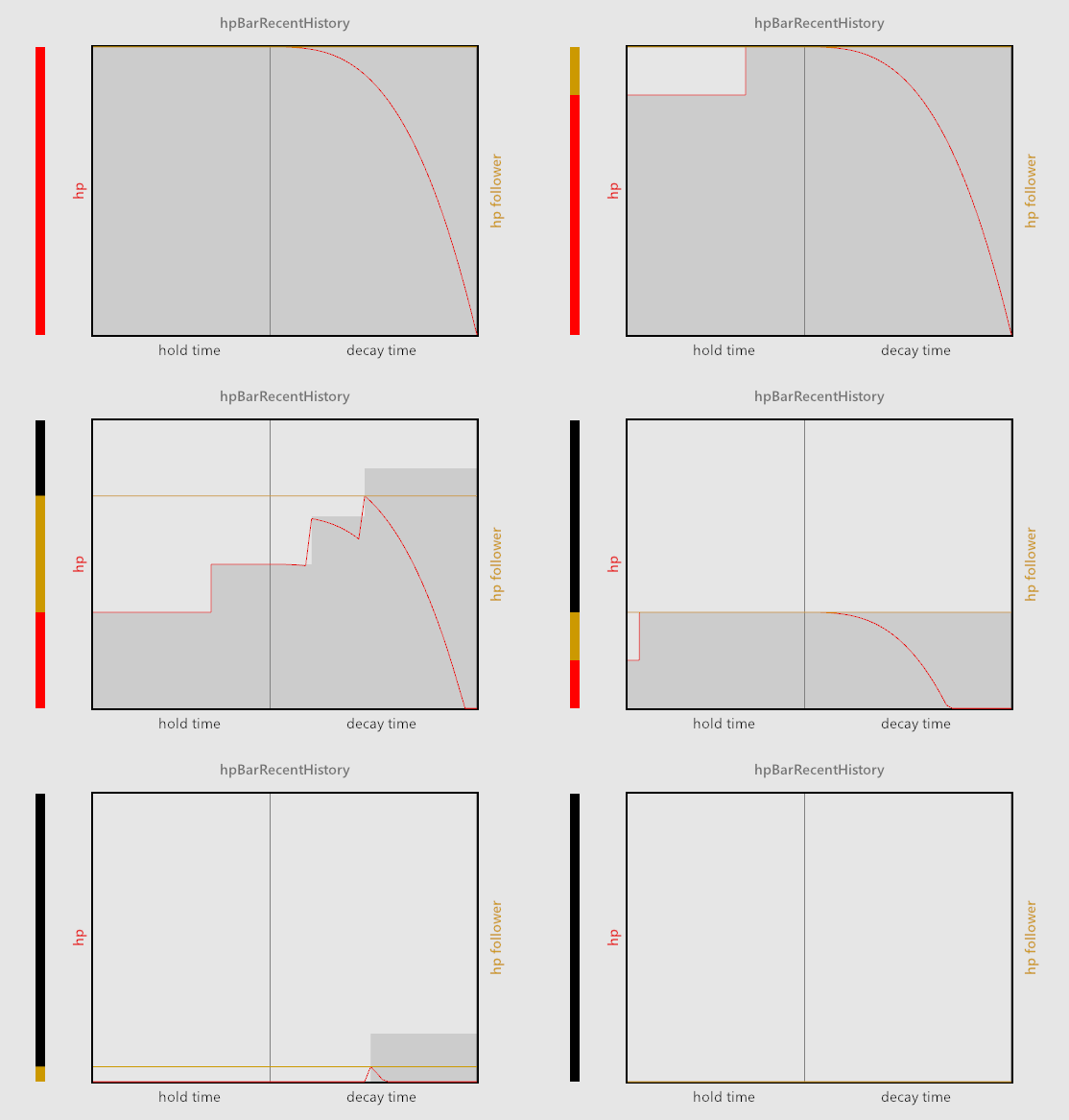
The gif above illustrates these mechanics. In grey, we see the current data in the hpBarRecentHistory array, i.e. the health values of the most recent frames (with new frames appearing on the left). The red line shows the post-bias health value (t in the code) of each recent frame. The yellow line shows the highest of all post-bias health values, a.k.a the “follower bar”. And the bar to the left shows how these values match to the final animation.
I’ll end by talking a bit about alternatives and variations to this method.
Frame Rate Independence
This implementation requires a fixed frame rate, but it could be easily adapted to a variable frame rate as follows. Instead of a frame-by-frame history, keep a list of recent damage events that log the previous health value, the new health value, and a timestamp. You can purge events that are older than the longest possible animation time. Then simply iterate the recent events, evaluate their decay animation at the current time based on the event’s starting conditions, and keep the highest value for the “follower bar”. This is also more efficient, although the performance cost of all this is negligible anyway.
Constant Time
As the code stands, the “follower bar” moves at a constant rate, independent of how much damage you took. If you wanted it to move faster when taking higher amounts of damage, and slower when taking low amounts, so that the effect lasts about the same amount of time for every individual hit, you would have to find another method. An event-based method (as described above) would probably be a better starting point. The challenge would then be what to do when there are multiple hits in effect at once, to which I see two solutions off the top of my head: a) just apply a quick falloff after the constant time period, so that recent hits are prioritized, or b) apply some sort of smoothing.